AI photo editing is becoming increasingly popular on Instagram, Facebook, and other social media platforms. Many creators are using AI photo editing prompts to transform their ordinary pictures into stylish, cinematic, and eye-catching images. One of the interesting trends is the Sheru Bhai AI Photo Editing Prompt 2026, which helps users create unique Sheru Bhai-style photos with creative backgrounds, attractive outfits, and professional-looking effects.
If you have seen trending Sheru Bhai AI photos on Instagram Reels or Facebook and want to create similar images, you can use AI image editing tools. You do not need advanced photo editing skills or professional software. Simply upload your photograph, enter a suitable AI editing prompt, and let the AI tool transform your image.
In this article, you will learn about Sheru Bhai AI photo editing prompts, how to use them, popular editing styles, and tips for creating high-quality AI-generated photos.
What Is Sheru Bhai AI Photo Editing Prompt 2026?
The Sheru Bhai AI Photo Editing Prompt is a text instruction that tells an AI image generator how to create or edit a photograph in a particular style. These prompts can help you generate stylish portraits, attitude photos, cinematic looks, and creative social media pictures.
The main purpose of the Sheru Bhai AI photo editing trend is to give your normal photograph a fresh and attractive appearance while maintaining your original facial identity.
You can experiment with different outfits, backgrounds, lighting effects, poses, and colour combinations. Whether you want a realistic portrait or a dramatic cinematic image, the right AI prompt can help you achieve your desired result.
Best Sheru Bhai AI Photo Editing Prompts 2026
Here are some creative Sheru Bhai AI photo editing prompts that you can copy and use with compatible AI photo editing tools.
1. Beside a lion in a white suit at a hotel entrance (girls)
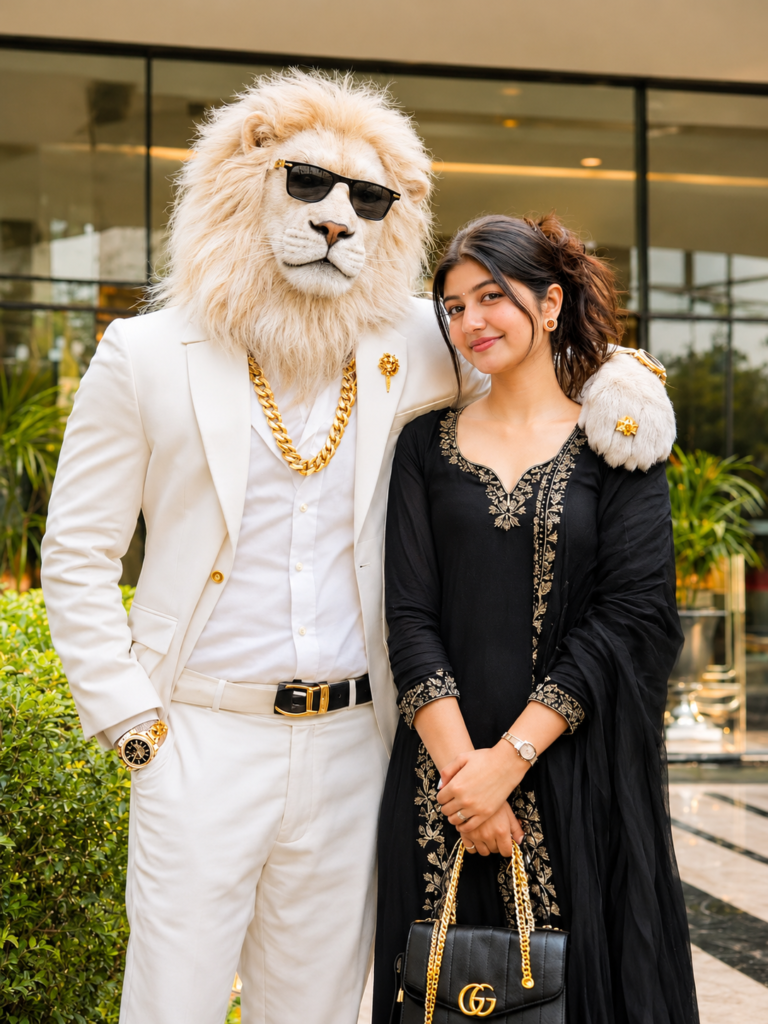
Create an ultra-realistic cinematic DSLR photograph of me standing beside a majestic white lion-headed humanoid character.

MY LOOK: Preserve my original face, facial features, hairstyle, skin tone and identity 100%. I am wearing an elegant premium black dress, stylish heels, delicate golden jewellery, a beautiful handbag and a luxury wristwatch. Give me a natural, charming smile with elegant styling.

WHITE LION: A tall, majestic humanoid white lion with extremely realistic white furry face, a royal personality, stylish black sunglasses, premium white formal suit, white shirt, heavy golden chain, golden wristwatch and luxury golden accessories.

POSE: The lion stands beside me with one arm naturally placed around my shoulder like my best friend. I stand confidently beside the lion, smiling naturally at the camera.

LOCATION: Luxury modern hotel entrance with beautiful glass architecture, decorative greenery and warm cinematic lighting.

PHOTOGRAPHY: Professional DSLR photography, realistic skin texture, detailed white lion fur, cinematic depth of field, natural shadows, sharp facial details, premium color grading, ultra-HD 8K quality.

STRICT IDENTITY LOCK: Use my uploaded reference photo and preserve my original identity 100%. Do not modify, replace or reshape my facial features.

Aspect ratio: 4:5.
2. Arm around the shoulder on palace steps (boys)
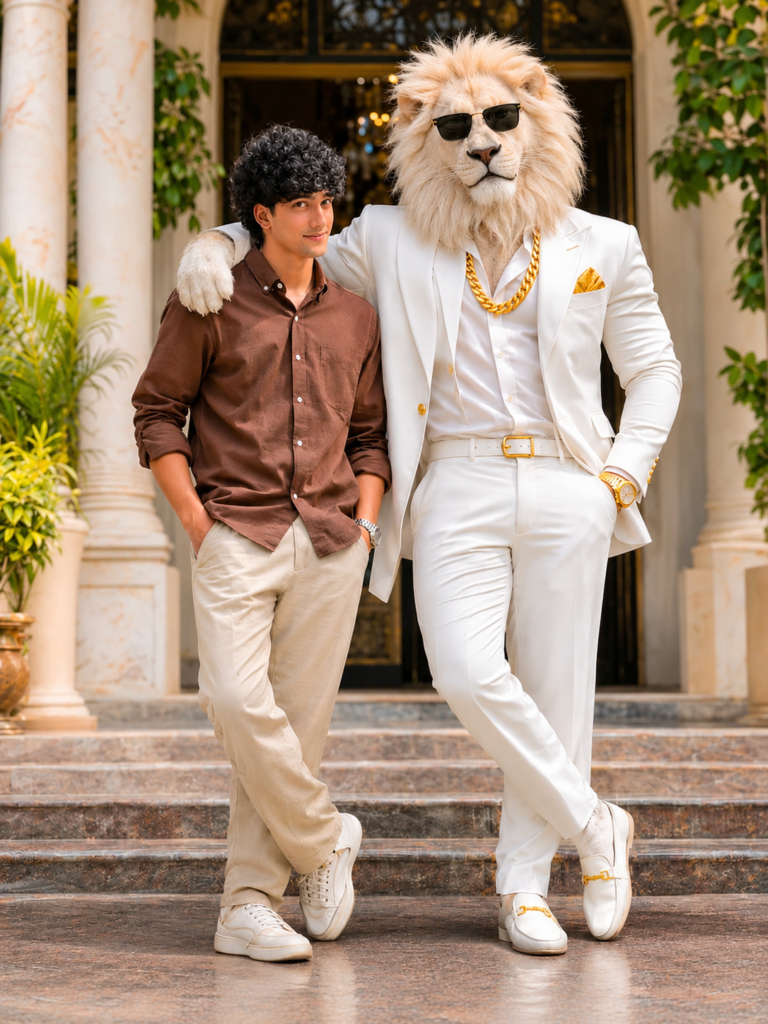
Create an ultra-realistic cinematic 8K DSLR full-body portrait using my uploaded photo as the STRICT FACE AND OUTFIT REFERENCE. Preserve my exact original facial identity, face shape, skin tone, curly black hairstyle, eyes, eyebrows, nose, lips, teeth, moustache, beard, natural smile and body proportions with 100% accuracy. Keep my original black, white and grey checked shirt EXACTLY the same, including its pattern, colours, collar, buttons, sleeves and fit. Do not change my clothing or accessories. Show me standing confidently beside a majestic, giant, ultra-realistic white lion with a thick cream-white mane. The lion stands on my left side with one front paw naturally resting on my shoulder. The lion wears a premium white royal formal suit, heavy golden chain, golden wristwatch, golden pocket square and stylish black sunglasses. Both face the camera with confident expressions. Place us at a luxurious royal palace entrance featuring elegant cream marble pillars, beautiful architecture and soft green plants. Professional cinematic photography, 85mm DSLR lens, f/1.8, natural lighting, realistic shadows, sharp facial details, detailed fur texture, realistic anatomy, premium Instagram photography, cinematic colour grading and beautiful depth of field. ABSOLUTE PRIORITY: My original face and checked shirt must remain unchanged. Only add the white lion and replace the background. Do not generate a different face, hairstyle or outfit. No text, no logos, no watermark. Vertical 4:5 composition, ultra-realistic 8K quality.
How to Create Sheru Bhai AI Photos Using Prompts?
Creating Sheru Bhai AI photos is simple, even if you are a beginner. Follow these steps to generate your own trending AI pictures.
Step 1: Choose an AI Photo Editing Tool ChatGPT or Gemini.
First, open an AI image generation or photo editing application that supports reference image uploads and text prompts. Choose a tool that allows you to maintain facial identity.
Step 2: Upload Your Original Photo
Select a clear photograph from your mobile gallery. For better results, use a high-quality image where your face is clearly visible.
Step 3: Copy the Sheru Bhai AI Prompt
Choose your favourite Sheru Bhai AI photo editing prompt from this article. Copy the complete prompt and make any changes according to your preferred outfit, background, or photo style.
Step 4: Paste the Prompt
Open the AI editing feature and paste your copied prompt into the text instruction box. Make sure the prompt clearly explains the style and appearance you want.
Step 5: Generate Your AI Photo
Click the generate or create button. The AI tool will process your uploaded photograph and generate an edited image based on your instructions.
Step 6: Save and Share Your Photo
After generation, check the final result. If you like the image, save it to your device. You can share your Sheru Bhai AI photo on Instagram, WhatsApp, Facebook, and other social media platforms.
Best Tips for High-Quality Sheru Bhai AI Photos
If you want your AI-generated pictures to look realistic and professional, follow these useful tips:
- Use HD Photos: Always upload a clear and high-resolution photograph.
- Choose the Right Prompt: Include details about clothing, background, lighting, and camera style.
- Maintain Face Identity: Add instructions to preserve your original facial features.
- Try Different Styles: Experiment with royal, cinematic, attitude, and street-style prompts.
- Avoid Excessive Effects: Too many artificial effects can make your photograph look unrealistic.
- Use Good Lighting: Professional lighting instructions can improve the overall appearance of your AI photo.
Why Is Sheru Bhai AI Photo Editing Trending in 2026?
AI photo editing is attracting attention because it allows people to create professional-looking pictures without spending hours learning complicated editing techniques.
The Sheru Bhai AI photo editing trend offers an interesting way to experiment with stylish portraits and creative looks. Social media creators can use these images for Instagram posts, profile pictures, WhatsApp status updates, and other content.
Another reason behind this trend is the simplicity of AI prompts. Users only need an original photograph and a suitable text instruction to generate different creative versions of their pictures.
Explore Trending AI Photo Editing Prompts on Editing4uu.in
If you love creating stylish and trending AI-generated photos, Editing4uu.in is a great place to explore creative photo editing ideas and the latest AI prompts. On Editing4uu.in, you can discover Sheru Bhai AI Photo Editing Prompt 2026, cinematic AI photo editing styles, viral Instagram photo trends, and easy-to-use AI prompts for beginners. Our goal is to help users create attractive, realistic, and professional-looking AI photos without advanced editing skills. Visit Editing4uu.in to explore new AI photo editing prompts, creative editing techniques, and trending ideas to make your social media pictures more unique and eye-catching.
Conclusion
The Sheru Bhai AI Photo Editing Prompt 2026 is a creative way to transform ordinary photographs into stylish and attractive AI-generated portraits. With the right prompt and a suitable AI editing tool, you can experiment with royal looks, cinematic portraits, fashionable outfits, and trending social media styles.
Simply upload your photo, copy your favourite prompt, and generate your image. Remember to use a clear reference photograph and include instructions to preserve your original facial identity for more realistic results.
Frequently Asked Questions (FAQs)
1. What is the Sheru Bhai AI Photo Editing Prompt 2026?
It is a text-based AI instruction that helps users create stylish and creative Sheru Bhai-inspired photographs using AI photo editing tools.
2. How can I create Sheru Bhai AI photos?
Upload your photograph to a compatible AI editing tool, copy a Sheru Bhai AI prompt, paste it into the prompt box, and generate your edited image.
3. Can I create Sheru Bhai AI photos for free?
Some AI photo editing platforms offer free image generation or limited free credits. However, certain advanced features may require a paid subscription.
4. Which photo is best for Sheru Bhai AI editing?
A clear, high-quality photograph with a visible face and good lighting is generally best for AI photo editing.
5. Can I use Sheru Bhai AI photos on Instagram?
Yes. You can share your AI-generated photographs on Instagram, Facebook, WhatsApp, and other social media platforms, subject to the tool’s usage terms.
6. How can I keep my original face in AI-generated photos?
Include instructions such as “preserve the original facial identity, face shape, skin tone, eyes, nose, and hairstyle” in your AI photo editing prompt. Results may vary depending on the AI tool.
7. Can beginners use Sheru Bhai AI prompts?
Yes. Beginners can simply copy and paste the prompts provided in this article and follow the image generation steps.